 Data toolfare buys · quoted first
Ask your AI to run the exact image or video model you want.
Run a specific image or video generation model hosted on fal — by its model id, with that model’s own inputs — and read back runs that are still in progress, answered inside ChatGPT, Claude, Codex or Cursor. No fal account or key of your own: toolfare runs each generation and tells your AI the price before it starts.
1Connect your AI app
Pick the app you use. You do this once, and every API on toolfare is then available in it.
Add toolfare as a connector in Claude
Add to Claudehttps://api.toolfare.ai/mcp
- 1Open Customize → Connectors and choose "Add custom connector".
- 2Paste this URL as the remote MCP server URL.
- 3Leave the OAuth client id and secret under Advanced settings empty.
- 4Complete the browser authorization, then return to your conversation.
Custom connectors are available on Free, Pro, Max, Team and Enterprise. A Free account may hold one custom connector in total.
Claude’s own instructions2What to ask
Copy a prompt into your AI app once you’re connected. It picks the right one of the 3 tools and tells you the price first.
Run a named generation model
Invokes one model on fal by its id, with that model’s own input schema, and returns what it produced — or a queue position when it is still running.
- “Generate a product shot with this image model on fal.”
- “Make a five-second video from this image with a fal video model.”
Collect a run that was still going
Fetches the result of a run that returned a queue position instead of an image or video.
- “Is that video generation finished yet?”
- “Get the result of the run I started earlier.”
Also available: Check whether a queued fal run has finished
Samples
Real calls made through toolfare: the question, and what came back. Responses are trimmed, never edited.
Generate a product shot of a black earbud case on a terracotta pedestal with a fast fal image model.
{ "status": "IN_QUEUE", "request_id": "01a18075-7094-7e33-a006-7523125faba3", "response_url": "https://queue.fal.run/fal-ai/flux/requests/01a18075-7094-7e33-a006-7523125faba3", "status_url": "https://queue.fal.run/fal-ai/flux/requests/01a18075-7094-7e33-a006-7523125faba3/status", "queue_position": 0 }fal_run_model28 Oct 2026
Is that image finished? Get me the result.
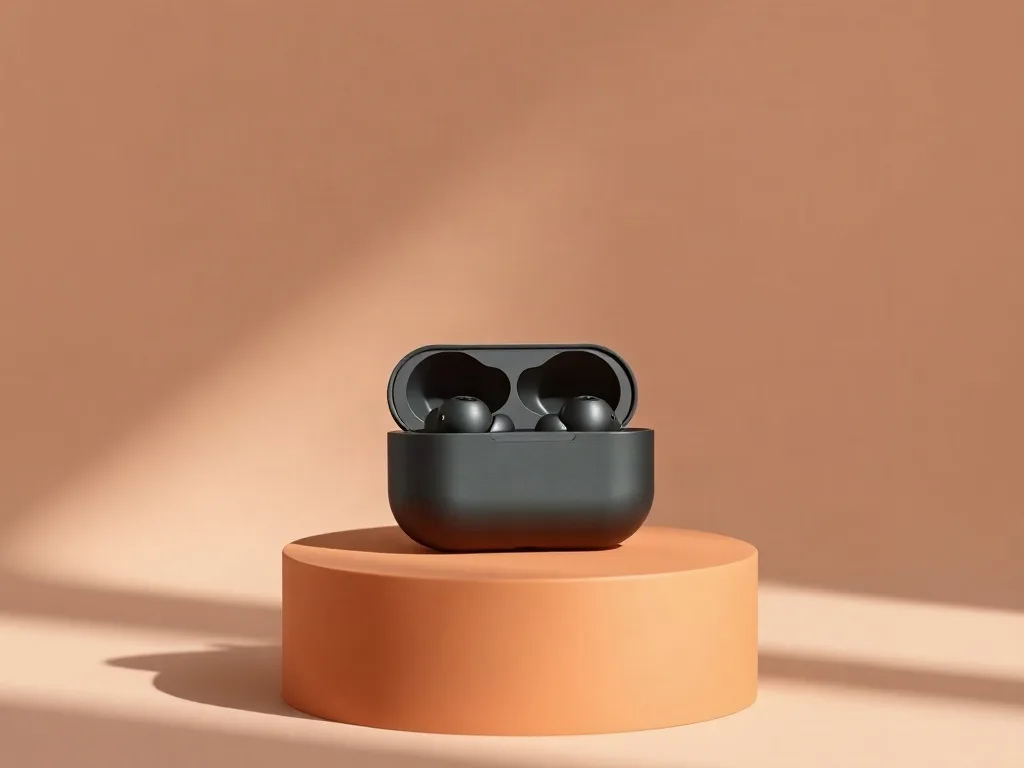
{ "images": [ { "url": "https://v3b.fal.media/files/b/0ab023c6/cyxDPYRPwPB6rYp9c5TJK.jpg", "width": 1024, "height": 768, "content_type": "image/jpeg" } ], "timings": { "inference": 0.9652584180003032 }, "seed": 321705933, "has_nsfw_concepts": [ false ], "prompt": "Studio product photo of a matte black wireless earbud case on a pale terracotta pedestal, soft shadow, minimal ad layout, clean negative space" }fal_get_queue_result28 Oct 2026
1Create an API key
One key and one endpoint for every API on toolfare.
export TOOLFARE_API_KEY='tf_live_…'
2Make a call: Run a named generation model
The same request three ways. max_cost is in credits (1,000 credits = $3) and refuses any call quoted above it.
curl -sS https://api.toolfare.ai/mcp \
  -H "Authorization: Bearer $TOOLFARE_API_KEY" \
  -H "Content-Type: application/json" \
  -H "Accept: application/json, text/event-stream" \
-d '{"jsonrpc":"2.0","id":1,"method":"tools/call","params":{"name":"call_capability","arguments":{"tool_name":"fal_run_model","arguments":{"model_id":"fal-ai/flux/schnell","prompt":"Studio product photo of a matte black wireless earbud case on a pale terracotta pedestal, soft shadow, minimal ad layout, clean negative space","num_images":1},"max_cost":10}}}'3Every tool and its input
Send the tool name and its arguments as JSON; the reply is JSON too.
fal_run_modelInvokes one model on fal by its id, with that model’s own input schema, and returns what it produced — or a queue position when it is still running.
{ "model_id": "fal-ai/flux/schnell", "prompt": "Studio product photo of a matte black wireless earbud case on a pale terracotta pedestal, soft shadow, minimal ad layout, clean negative space", "num_images": 1 }fal_get_queue_resultFetches the result of a run that returned a queue position instead of an image or video.
{ "app_id": "fal-ai/flux", "request_id": "01a18075-7094-7e33-a006-7523125faba3" }fal_get_queue_statusCheck whether a queued fal run has finished
Samples
Real calls made through toolfare: the command, and the JSON it returned. Responses are trimmed, never edited.
{
  "tool_name": "fal_run_model",
  "arguments": {
    "model_id": "fal-ai/flux/schnell",
    "prompt": "Studio product photo of a matte black wireless earbud case on a pale terracotta pedestal, soft shadow, minimal ad layout, clean negative space",
    "num_images": 1
  }
}
{ "status": "IN_QUEUE", "request_id": "01a18075-7094-7e33-a006-7523125faba3", "response_url": "https://queue.fal.run/fal-ai/flux/requests/01a18075-7094-7e33-a006-7523125faba3", "status_url": "https://queue.fal.run/fal-ai/flux/requests/01a18075-7094-7e33-a006-7523125faba3/status", "queue_position": 0 }fal_run_model28 Oct 2026
{
  "tool_name": "fal_get_queue_result",
  "arguments": {
    "app_id": "fal-ai/flux",
    "request_id": "01a18075-7094-7e33-a006-7523125faba3"
  }
}
{ "images": [ { "url": "https://v3b.fal.media/files/b/0ab023c6/cyxDPYRPwPB6rYp9c5TJK.jpg", "width": 1024, "height": 768, "content_type": "image/jpeg" } ], "timings": { "inference": 0.9652584180003032 }, "seed": 321705933, "has_nsfw_concepts": [ false ], "prompt": "Studio product photo of a matte black wireless earbud case on a pale terracotta pedestal, soft shadow, minimal ad layout, clean negative space" }fal_get_queue_result28 Oct 2026
Use it when
- You need an image or a video from a specific named model.
- You are testing creative variants across models and want to choose the model yourself.
Look elsewhere when
- You just want an image and do not mind which model makes it.
- You do not know the model id. The address is the model, so there is nothing sensible to run without one.
- You want a finished ad video from a product page, with a script and presenter. Use this instead
fal.ai directly, or through toolfare
Directly
- A fal account with a prepaid balance
- An API key of your own to hand to an agent
- Your own code to submit, poll and download runs
Through toolfare
- Per run, quoted before it starts, on the same balance as everything else
- No fal account and no key to hand to an agent
- Brief, generation and review in the same conversation
You get model runs on demand, not a creative studio. There is no gallery of past generations, no fine-tuning and no workflow builder through the MCP connection — and every run is charged, including the ones you throw away.
Limits
- You name the model and supply its inputs; a wrong id or input is rejected by fal.
- Video generation is slow and costly — a run may come back as a queue position to collect later, and a finished video is charged as a fifteen-second clip even when it is shorter.
- Pay as you go from your toolfare balance, in US dollars; there is no subscription. A call runs when your balance covers its quote.